

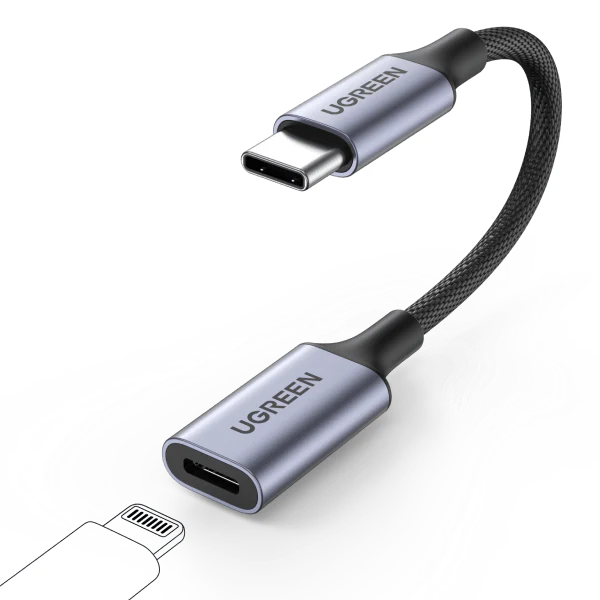


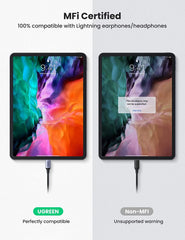


UGREEN USB C to Lightning Audio Adapter
UGREEN Braided USB-C to Lightning Dongle Adapter Cable Type C Male to Lightning Female Cord for iPad,...
- $9.10
$30.32- $9.10
- Unit price
- per
Hurry up! Only 1000 left
Limited-Time Offers, End in:
151D
8H
23M
0S
Subtotal:
$9.10
10 customers are viewing this product
Couldn't load pickup availability
Free Shipping
Free standard shipping on orders
Free Returns
Learn More.

Description
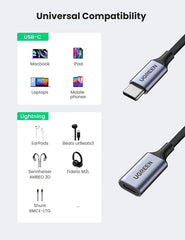
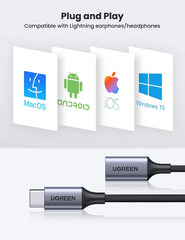
xUGREEN Braided USB-C to Lightning Dongle Adapter Cable Type C Male to Lightning Female Cord for iPad, Macbook and Android USB C Phones Listen to Your USB-C Devices This work perfectly to convert if you have a lightning earphone but your device only has the USB-C port. Built-in Powerful DAC Chip, Immerse in Your Music Feast Empowered a high-performance DAC chip, Type-C to Lightning audio adapter is compatible with up to 24bit/48Khz, you can get higher fidelity sound experience from it, hear the clarity in any genre of music. Made of enameled copper, ensuring high fidelity sound quality and without current noise. Plug and Play Compatible with Lightning earphone/headphones Configuration Instructions on Macs: Connect the adapter to Mac and connect Lightning headphone to the adapter Choose Apple menu > System Preferences, then click Sound. Choose the Output tab and select "Lightning Audio Adapter Output.” Choose the Input tab and select "Lightning Audio Adapter Input.” Plug and Play Compatible with Lightning earphone/headphones Configuration Instructions on Macs: Connect the adapter to Mac and connect Lightning headphone to the adapter Choose Apple menu > System Preferences, then click Sound. Choose the Output tab and select "Lightning Audio Adapter Output.” Choose the Input tab and select "Lightning Audio Adapter Input.” Tailored for MFi-certified Lightning headphones - EarPods with Lightning connector - Beats UrBeats3 with Lightning connector - Sennheiser Ambeo Smart Headset - Audeze Sine DX, EL-8 Titanium, iSine10 - Pioneer Rayz, Rayz Plus, Rally - Radius HP-NEL21, HP-NEL31, HC-M100L, and HP-NHL21 - Libratone Q-Adapt in-ear lightning headphones - RHA MA650i with Lightning - Moshi Avanti LT, Mythro LT Note: It only works with Windows laptops with Windows 10 or above. For Huawei phones, this USB C to Lightning Female Adapter can’t support phone call. Connect the original Apple earphones as much as possible. Voice only No charging Capabilit
Related Products
Example product title
- $9.10
$30.32- $9.10
- Unit price
- per
Example product title
- $9.10
$30.32- $9.10
- Unit price
- per
Example product title
- $9.10
$30.32- $9.10
- Unit price
- per
Example product title
- $9.10
$30.32- $9.10
- Unit price
- per
Example product title
- $9.10
$30.32- $9.10
- Unit price
- per
Example product title
- $9.10
$30.32- $9.10
- Unit price
- per
Example product title
- $9.10
$30.32- $9.10
- Unit price
- per
Example product title
- $9.10
$30.32- $9.10
- Unit price
- per
Example product title
- $9.10
$30.32- $9.10
- Unit price
- per
Example product title
- $9.10
$30.32- $9.10
- Unit price
- per
Recently Viewed Products
Example product title
- $9.10
$30.32- $9.10
- Unit price
- per
Example product title
- $9.10
$30.32- $9.10
- Unit price
- per
Example product title
- $9.10
$30.32- $9.10
- Unit price
- per
Example product title
- $9.10
$30.32- $9.10
- Unit price
- per
Example product title
- $9.10
$30.32- $9.10
- Unit price
- per
Example product title
- $9.10
$30.32- $9.10
- Unit price
- per
Example product title
- $9.10
$30.32- $9.10
- Unit price
- per
Example product title
- $9.10
$30.32- $9.10
- Unit price
- per
Example product title
- $9.10
$30.32- $9.10
- Unit price
- per
Example product title
- $9.10
$30.32- $9.10
- Unit price
- per
- Choosing a selection results in a full page refresh.


